
Is It Cheaper to Hire a Virtual Assistant or Use AI Automation?
If you're trying to reduce administrative work, you may be deciding between two very different solutions: hiring a virtual assistant or automating the work with software and AI-powered tools.
There isn't a universal cheaper option.
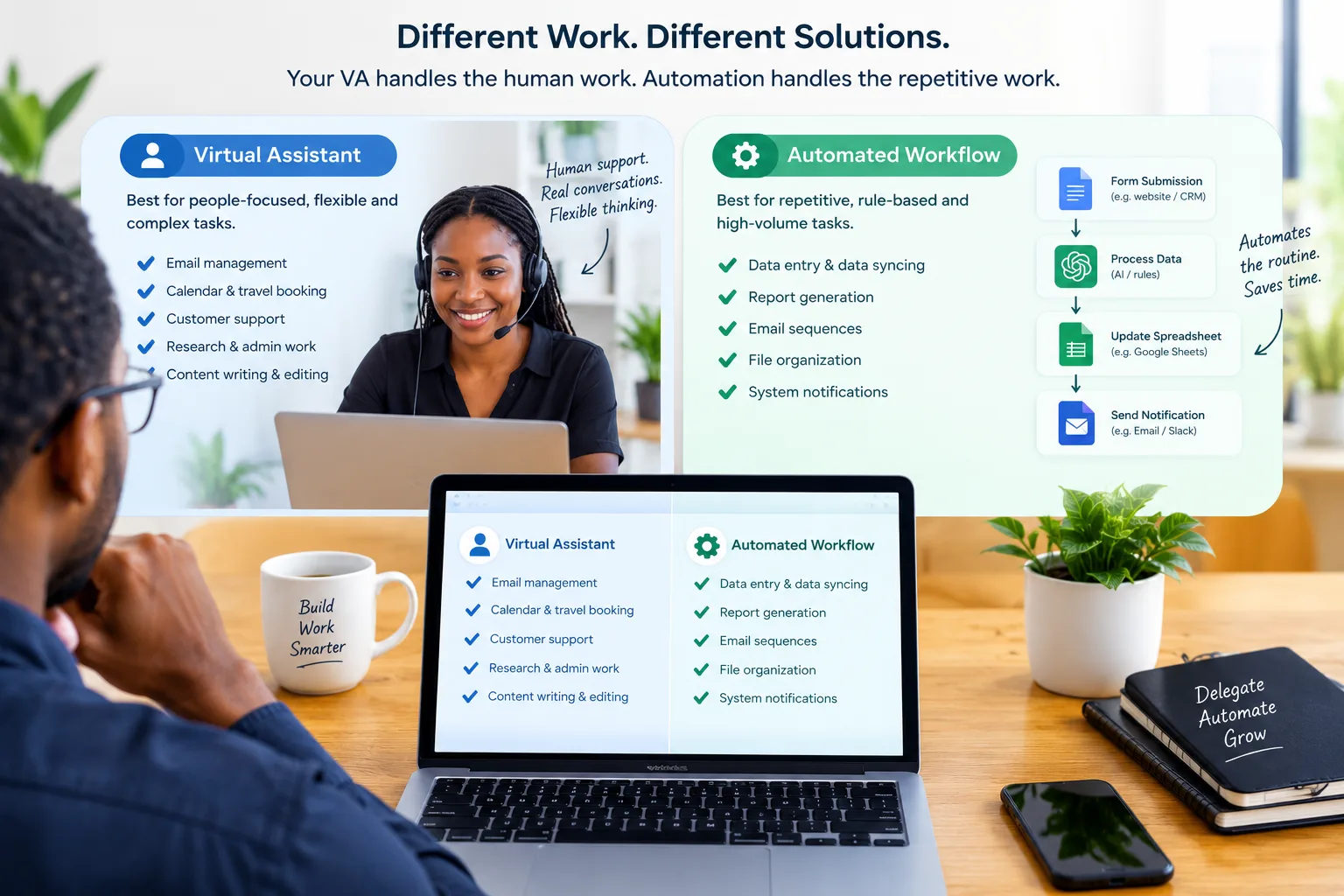
Automation is often more economical for repetitive, predictable processes that follow clear rules. A virtual assistant is often more useful when work requires judgment, communication, context, or exceptions.
In many businesses, the most practical answer is not either/or. Automation can handle predictable parts of a workflow while a virtual assistant handles the tasks that still require human judgment.
What is the difference?
A virtual assistant is a human professional who performs administrative, operational, or other agreed-upon tasks remotely.
Automation uses software to perform tasks according to predefined rules or workflows. AI-powered automation can extend this by handling certain tasks that involve interpreting or generating information.
The difference becomes clearer when you look at the type of work involved.
Automation is strongest when the process is predictable
For example:
New form submission → add contact to database → send confirmation → notify team.
A workflow like this can often be automated because the steps are consistent.
A virtual assistant is stronger when context matters
Consider:
A customer sends an unusual complaint and asks for a special solution.
The best response may depend on the customer's history, the value of the relationship, company policy, and circumstances that aren't captured by a simple rule.
That is where human judgment can be more useful.
Which option is cheaper?
The answer depends on the total cost of completing the work, not just the monthly price of the tool or assistant.
For a virtual assistant, consider:
- Hourly or monthly cost
- Training time
- Management time
- Software access
- Quality control
- Communication overhead
For automation, consider:
- Software subscriptions
- Setup costs
- Integration costs
- Maintenance
- Monitoring
- Error handling
- Your own time configuring and managing the system
A low-cost automation tool isn't automatically cheaper if it takes weeks to build and constantly requires troubleshooting.
Likewise, an inexpensive assistant isn't automatically economical if you spend more time supervising them than the work saves.
When automation usually wins
Automation tends to make more sense when the task is:
- High volume
- Repetitive
- Rule-based
- Predictable
- Easy to test
- Stable over time
Examples include:
- Moving information between systems
- Sending standard notifications
- Creating routine reminders
- Organizing certain types of data
- Triggering follow-up workflows
- Generating recurring reports from structured data
The more predictable the process, the stronger the case for automation.
When a virtual assistant usually wins
Human support tends to be more useful when the task requires:
- Judgment
- Communication
- Research
- Context
- Prioritization
- Handling exceptions
- Relationship management
- Adaptation
Examples include:
- Managing complex email
- Coordinating with customers
- Researching potential suppliers
- Following up with leads
- Preparing information for a decision
- Handling unusual requests
- Coordinating multiple people
These tasks can sometimes be partly automated, but they may still benefit from human oversight.
A simple comparison
| Factor | Virtual assistant | Automation |
|---|---|---|
| Repetitive work | Good | Excellent |
| Rule-based work | Good | Excellent |
| Human judgment | Excellent | Limited |
| Complex communication | Excellent | Variable |
| High-volume processing | Good | Excellent |
| Handling exceptions | Excellent | Depends on system |
| Initial setup | Usually simpler | Can be more complex |
| Ongoing human involvement | Higher | Usually lower |
| Flexibility | High | Depends on workflow |
| Best use | Human-led administrative work | Predictable processes |
The right choice depends on the nature of your workflow.
Don't compare the wrong things
One common mistake is comparing an assistant's hourly rate directly with the price of an automation subscription.
That ignores the work required to make each solution successful.
Suppose an automation platform costs a small monthly fee but requires substantial configuration, integrations, testing, and maintenance.
The software price alone doesn't represent the true cost.
The same applies to a virtual assistant.
If you spend hours every week correcting mistakes or answering questions because the process was never documented, the headline hourly rate doesn't tell the whole story.
Calculate the cost per completed task
A better comparison is to ask:
What does it cost to complete the task successfully?
For example, suppose a process involves 500 routine records each month.
Option A: A virtual assistant processes them.
Option B: An automated workflow processes them.
Compare:
- Setup cost
- Monthly cost
- Time required from you
- Error rate
- Review time
- Cost of fixing mistakes
The cheapest solution is the one that delivers the required result at the lowest sustainable total cost.
What about a hybrid approach?
A hybrid model can be especially useful.
Consider customer enquiries.
Automation might:
- Receive the enquiry.
- Categorize it.
- Collect basic information.
- Send an acknowledgement.
- Route it to the appropriate person.
A virtual assistant might then:
- Review the enquiry.
- Respond personally.
- Research an answer if necessary.
- Escalate unusual issues.
This avoids asking a human to perform repetitive steps while avoiding the limitations of trying to automate every decision.
Start with the process, not the technology
Before choosing a solution, map the workflow.
Write down:
- What triggers the task?
- What information comes in?
- What steps happen?
- Where does judgment enter?
- What exceptions occur?
- What result is required?
Then identify which steps are predictable enough to automate.
The remaining steps may be suitable for a virtual assistant.
Five questions to ask before choosing
1. How often does the task happen?
High-frequency work may justify automation.
2. How predictable is the process?
The more consistent the process, the easier it is to automate.
3. How much judgment is required?
Human judgment generally makes a virtual assistant more attractive.
4. What happens when something goes wrong?
If errors have serious consequences, consider how easily they can be detected and corrected.
5. How much is your own time worth?
Building and maintaining an automation system can require significant involvement from the business owner or team.
Your time is part of the cost.
So, which should you choose?
Choose automation when you have a stable process that happens frequently and follows clear rules.
Choose a virtual assistant when the work involves communication, judgment, research, coordination, or exceptions.
Consider both when the workflow contains predictable steps and human decisions.
The most important point is that cost should be measured against the outcome, not the sticker price.
A virtual assistant may be more expensive than software but dramatically reduce the amount of work that reaches you.
Automation may cost less per task but require more setup and maintenance than expected.
Start by identifying the process you want to improve. Then compare the total cost, time saved, reliability, flexibility, and level of human involvement required.
That will give you a much more useful answer than simply asking which option has the lower monthly price.